Scan or import
Capture a receipt with your camera or import it from your photo library. Multiple images can be kept as pages of the same receipt.
 SnowHutSTUDIO
NeoScan
Receipt scanning & expense tracking
Scan a receipt or import an image. NeoScan turns it into expense data you can review and report on. Export to Google Sheets or Airtable, or send receipt data to other apps through webhooks.
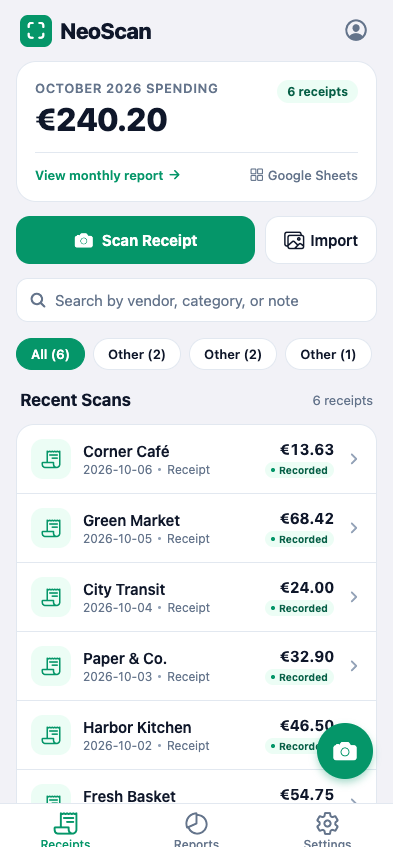
From paper to expense records
Capture the receipt.
Check the details. Keep the record.
Capture a receipt with your camera or import it from your photo library. Multiple images can be kept as pages of the same receipt.
Extract receipt details such as merchant, date, currency, and total from the image, reducing the information you need to enter by hand.
Check the extracted information and correct the merchant, date, currency, total, or category. Search your receipt library by merchant or category.
Keep the receipt image with its extracted details. Export receipts as PDFs and monthly expense records as CSV files for your own spreadsheets.
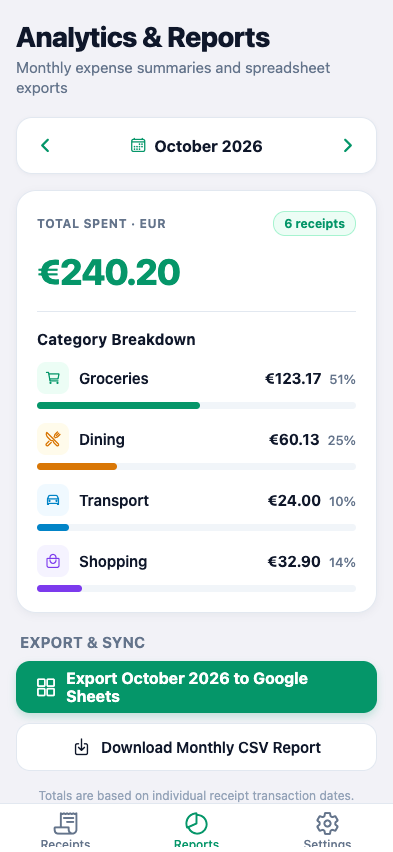
See where your money goes
Monthly reports bring your recorded receipts together by receipt date and currency. Review your spending, then export the month’s expense records as a CSV file.
Different currencies are reported separately. NeoScan does not combine them into a single total or apply exchange rates.
Signed-in cloud sync makes receipt data available across devices. Original image backup is controlled separately in settings.
Connected to your tools
From scanned receipts
to the applications you already use.
Send receipt data to a spreadsheet you choose. Map details such as merchant, date, category, currency, and total to your columns, so your expense records fit your existing sheet.
Export receipts to your selected Airtable base and table. Match receipt details to your fields to keep expenses alongside the rest of your records.
Send structured receipt data to applications that accept webhooks. Connect your own endpoint or use tools such as Zapier, Make, and n8n to pass the data into your workflow.
Google Sheets and Airtable exports are included in Pro and Business. Webhooks are included in Business.
A few useful details
Yes. You can review and edit the extracted expense details. Cropping and page editing are also available for the receipt images.
Export receipts as PDFs and monthly reports as CSV. You can also send receipt data directly to Google Sheets or Airtable, or connect other applications through webhooks.
For access and product enquiries, email contact@snowhutstudio.com.
Get in touch
Have a question about the application or its receipt and expense workflow?